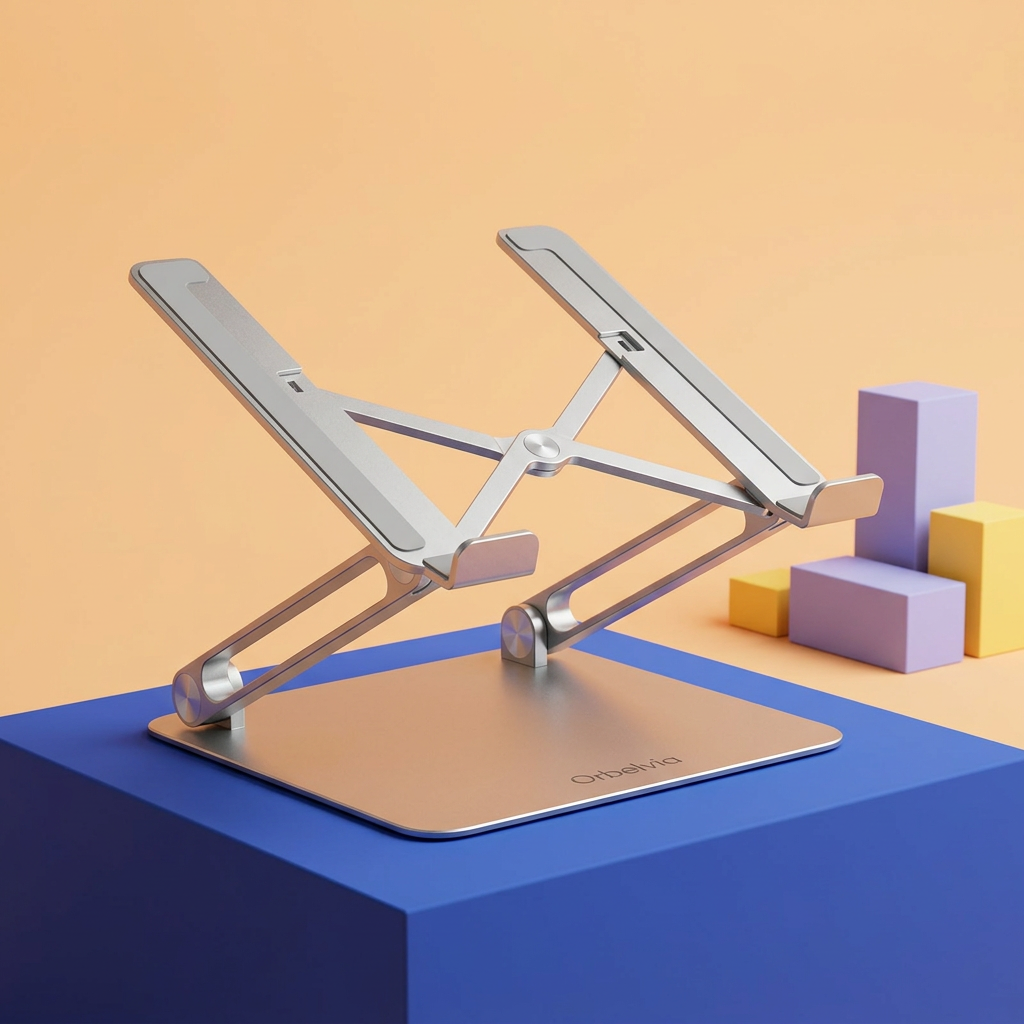
Orbelvia Foldable Aluminum Laptop Stand with Articulated Support for a More Intentional Home Office, Study Desk & Everyday Workspace
Orbelvia Foldable Aluminum Laptop Stand with Articulated Support for a More Intentional Home Office, Study Desk & Everyday Workspace
Couldn't load pickup availability

Orbelvia Foldable Aluminum Laptop Stand with Articulated Support for a More Intentional Home Office, Study Desk & Everyday Workspace
Your Laptop Does Not Have to Define the Layout of Your Entire Desk.
A laptop makes work portable. But once it lands on a table, the screen, keyboard and available writing space all tend to compete for the same small area. The Orbelvia Foldable Aluminum Laptop Stand offers another way to arrange that space: lift the laptop into its own position, give your separate keyboard a place in front, and build the rest of the desk around the way you actually work.
Its silver aluminum-alloy construction brings a clean architectural look to the setup. A broad base anchors the visual design, paired articulated arms connect the base to the inclined support, and front retaining lips sit at the lower edge of the laptop platform. Rather than adding another bulky object to your desk, the open-frame silhouette keeps the arrangement visually light.
This is a practical workspace accessory with a simple purpose: give your laptop a dedicated raised support and give you more choice in how your desk comes together.
🖥️ Start with the Screen. Then Arrange Everything Around You.
Think about the tasks that fill your day. Reading a document asks something different from entering a long spreadsheet. An online meeting is not the same as sketching ideas beside your computer. With an articulated stand, you can explore a screen position that suits the task instead of treating the tabletop as the only possible place for your laptop.
Make adjustments with the laptop removed, following the product instructions, then check that the stand is securely positioned before placing your device back on it. The best arrangement depends on your chair, desk, device and personal preferences. There is no single setting that fits every person or every workspace.
For extended typing, consider using a separate keyboard and mouse so your hands can remain at desk level while the laptop has its own raised position. These accessories are not part of the stand unless expressly included in your order.
The Design, Explained from the Desk Up
A broad foundation
The flat base has a restrained, rounded rectangular outline. It creates a defined footprint beneath the laptop and gives the structure a clean visual starting point. Position it on a firm, level surface with the entire base supported, rather than balancing it across an edge or on soft furniture.
Articulated support arms
The paired arms connect the base and upper support through visible joints. This mechanical layout is central to both the elevated form and the folding design. It also gives the stand its distinctive side profile: an open structure rather than a solid block under your computer.
An inclined laptop cradle
The upper support holds the laptop at an incline. The front retaining lips provide a lower resting edge, while the open space beneath the device keeps the underside separated from the tabletop. Check that the support and retaining edges suit your laptop's shape and thickness before use.
A coordinated silver finish
The metallic finish pairs naturally with neutral desk mats, dark keyboards and light wood surfaces. It can also act as a quieter element in a colorful workspace, balancing brighter stationery and accessories without competing for attention.
🧩 One Stand, Three Different Ways to Build Your Workspace
The focused home office. Place the laptop on the stand near the center of your viewing area, with a separate keyboard directly in front and the mouse beside your dominant hand. Keep a notebook to one side for the details that are easier to capture on paper. Leave enough space around the stand to adjust your arrangement without knocking other objects.
The study corner. Use the raised laptop as a dedicated place for reference material while keeping the desk surface available for reading and handwriting. A textbook, worksheet or sketchpad can sit beside the keyboard rather than being squeezed underneath it. Keep essential supplies within easy reach and put occasional-use items away.
The shared table. Not every home has a permanent office. A folding stand can be part of a setup that comes out when work begins and is put away when the table needs to return to everyday life. Remove the laptop, fold the stand according to its instructions and store it in a suitable place once the session is over.
Less Visual Clutter. More Deliberate Placement.
A thoughtfully arranged desk is not necessarily an empty desk. It is a space where objects have clear roles. The laptop has its support. The keyboard has its working area. Your notebook has a page you can actually reach. The stand helps define those zones without asking you to replace the furniture around them.
Its open profile also makes the structure easy to read at a glance. You can see the base, the arms and the space between the support and the desktop. That simple separation can make an arrangement feel more intentional, especially beside a slim keyboard and a neatly routed charging cable.
This is not a promise of a particular productivity improvement. It is an invitation to make a few practical choices about how your tools occupy the space you use every day.
📂 Open for Work. Fold Away When the Day Changes.
A dedicated desk accessory should not dictate how you use the room after work. The folding construction lets the stand move from its raised working form toward a more compact storage configuration. That makes it a useful option to consider for flexible rooms, shared work surfaces and people who prefer to clear the table at the end of the day.
Before putting it into a bag or drawer, check the actual folded measurements against the available space. Keep hard objects from pressing directly against the finish, and do not force the joints beyond their intended travel. A carrying pouch is not assumed to be included.
Foldability is about adapting your setup to your routine. Whether the stand stays on your desk overnight or is put away with your other work tools, the choice remains yours.
A Small Reset at the End of a Busy Afternoon
Imagine finishing the last call of the day. You close the document, move the notebook back onto its shelf and unplug the accessories you no longer need. The laptop comes off its support. The stand folds down. A table that held your working day can become a place for dinner, a drawing project or tomorrow's plans.
That transition is easy to overlook, but it can be one of the most satisfying parts of a flexible workspace. You do not need a different room for every activity. Sometimes you need tools that can take their place when they are useful and step aside when they are not.
🔎 Check the Fit Before You Commit
- Device dimensions: Compare your laptop's width, depth and thickness with the stand's confirmed support dimensions. Screen diagonal alone does not establish fit.
- Device weight: Confirm the manufacturer's rated load capacity before use. Do not assume the stand can support every laptop or additional stacked equipment.
- Contact points: Make sure the device rests securely on the intended support areas and that the front retaining edges do not interfere with its shape.
- Ventilation and cables: Keep your laptop's vents and connections unobstructed. The open design is not a substitute for following the computer manufacturer's ventilation guidance.
- Desk surface: Use a level, firm surface with enough room for the base and your surrounding accessories.
What This Stand Is, and What It Is Not
It is a folding aluminum-alloy laptop support. Its appeal comes from the articulated structure, inclined cradle and clean silver appearance.
It is not a powered cooling system. There are no cooling-performance figures claimed here, and the space beneath the laptop should not be read as a guaranteed temperature reduction.
It is not a universal-fit promise. Device size, weight and contact geometry still matter. Confirm the relevant specifications for your laptop before ordering.
It is not a medical product. Changing a screen position can be part of arranging a workspace, but the stand is not presented as a treatment for pain or a guarantee of a particular posture.
🧽 Keep the Setup Looking Considered
Remove your laptop before cleaning or repositioning the stand. For routine surface care, use a soft cloth and follow the supplied care instructions. Avoid harsh abrasives that may mark the finish. Keep fingers clear of moving joints when folding, and check that the support is properly positioned before each use.
When styling your desk, give the silver finish some breathing room. A dark desk mat can define the base neatly; a warm wood surface can soften the metallic look. Choose one or two accent colors for notebooks and accessories if you want a more coordinated arrangement without making everything match.
Make Your Next Workspace Feel Like Your Own.
The Orbelvia Foldable Aluminum Laptop Stand is for the person who wants a more deliberate relationship between their screen, their desk and the rest of their tools. Not a complicated workstation overhaul. Not another connected device to charge. Just a clean mechanical support that changes where your laptop sits and how the surrounding space can be arranged.
Build a setup for focused mornings, flexible afternoons and the moment work is done. Give your laptop a defined place, and make more thoughtful use of the desk around it.
Product offered: laptop stand. Laptops, keyboards, mice, desk accessories and decorative objects shown in styled images are presentation props, not included accessories. Confirm the supplied product specifications and package contents before purchasing.